
Atavism X (10.13.0) – Date of release 09.04.2026
New features
1. Regional PvP & Sanctuary Management
The PvP system is primarily defined by Region settings within the Atavism Standalone Editor, allowing for granular control over combat zones.
- Dynamic Zoning: Combat remains region-based, with the new ability to define Sanctuaries (Safe Zones) within a PvP region to exclude combat from specific coordinates (e.g., quest hubs or shops).
- Identification & Affiliation: Regions now include toggles to determine if Groups and Guilds are considered allies.
- Guild Requirements: Only players affiliated with a specific faction may create a guild.
- Guild Unity: Membership is restricted to players of the same faction.
- Visual Indicators: Players within these regions can be identified by faction-specific name colors (e.g., Red, Yellow, Blue) to distinguish allies from enemies.
2. Combat Engagement Modes
Regions can now be configured with three distinct entry types:
A. Automatic PvP (Standard)
-
- Behavior: Works as a standard “always-on” combat zone where players are flagged immediately upon entry based on their faction.
- Restrictions: Option to disable mounts and specific items (e.g., teleportation scrolls) within the PvP region based on applied PvP effect with a specific tag that can exclude execution of abilities with specific effects.
B. Chaotic PvP (Karma System)
-
- Initial Flagging: Attacking a neutral player flags the aggressor as “Purple.”
- Retaliation: If the target fights back, they also turn “Purple.” If a “Purple” player kills another “Purple” player, no karma penalty is applied.
- Player Killer (PK) Status: Killing a player who did not fight back turns the aggressor’s nickname “Red,” signifying negative karma with value defined in the parameter called PVP_KARMA_POINTS_PER_KILL – Integer – Default 20. A player with PK Status becomes an enemy of everyone.
- Karma Recovery: Negative karma is accrued per kill and can be reduced by slaying mobs. The amount of reduction is set in the Game Settings Parameter PVP_KARMA_POINTS_REDUCE – Integer – Default Value: 10.
- Idle: Player PvP flag starts blinking when the Player is going to exit PvP mode after not attacking or being attacked by others for a specific time, defined by the added parameter PVP_MARK_TIMEOUT – Integer – Default Value: 20 seconds.
C. Outlaw Mode (Toggleable PvP)
-
- Entry/Exit: A toggleable “PvP Entry” ability usable only within Outlaw regions.
- Flagging: Activating the ability flags the player as “Red” (Outlaw). Outlaws can only be attacked by other flagged Outlaws.
- Cooldowns: Players cannot exit Outlaw mode if they have attacked or been attacked recently (during combat mode). Combat mode can now be forced upon attack, and not only when being attacked, and it’s on a per-ability basis using the Enter Combat State checkbox.
3. Slay Announcements
A global notification system ensures competitive visibility.
- Formatting: By additional parameter PVP_KILLED_MESSAGE – String – Default Value: “{KILLED} was killed by {ATTACKER}” Where “KILLED” is the player that was killed and “ATTACKER” is the killer.
- Scope: Announcements can be configured to display locally (within the instance) or globally (server-wide).
4. Master Points & Currency System
A new PvP-exclusive currency, Master Points, has been implemented to reward combat performance.
- Points Acquisition: Killers receive points based on the rank difference between themselves and the victim.
- Rank Parity: Standard X points awarded for similar ranks.
- Underdog Bonus: Higher rewards for killing a player of a higher rank and losing fewer points when killed by such a player.
- Rank Penalty: Fewer points awarded for killing lower-ranked players and losing more points when killed by such a player.
- Point Loss: Players lose Master Points upon death in the PvP region.
Because it’s based on the currency, you can use any currency features available in Atavism, like Vendors, Auction House, effects that will add the currency, as well as quests, etc.
5. Rankings
The ranking system utilizes the existing Ranking Window, filtered for PvP performance.
-
- Stat Incentives: Reaching higher tiers can grant an effect buff that is automatically removed if the player’s rank drops.
- Leaderboards:
- Top 100 Overall (PvP Points/Currency): Ranked by total Master Points across all factions.
- Top 100 per Faction (PvP Points/Currency): Specific rankings for each faction.
- Top 100 PvP Killers: Specific rankings for each faction.
Changes to existing features
- Demo: Improved lighting quality by adding volumetric fog: https://github.com/CristianQiu/Unity-URP-Volumetric-Light
- Demo: Improved some shaders to support dissolve for better visual effects
- Demo: Improved resource nodes harvesting examples. Now trees are being replaced with a divided version, so the trunk remains while applying physics to the rest of the tree for natural fall. Added particle effects, as well as sounds and our animations.
- Items: Modified ammo in Inventory Info to be stored locally in the Object Manager Service and not have to query the Combat Service.
- Interactive Objects: Added checking the interaction distance in the interactive object
- Resource Nodes/Interactive Objects: Added checking the max harvest distance on the client side to prevent starting cooldown if the player was too far away.
- Server: Updated Gradle files.
- Server: Modified world.sh script by adding the -D switch to dump memory into the bin directory as files before the server stop is invoked.
Fixes
- Bonuses: Fixed the issue where bonuses were multiplied in the database.
- Combat: Fixed the issue with consuming effects by tags.
- Combat: Fixed the issue with the friendly effect ability.
- Combat: Fixed the issue with the recalculation of perception for stealth changes.
- Combat: Fixed the issue with the effect state storage data.
- Combat: Fixed the issue where Single Target Ability with Friendly or Enemy Target Subtype worked only on an enemy.
- Combat: Fixed the issue where cooldowns were multiplied in the database.
- Combat: Fixed the issue with stealth, where some properties were empty and triggered an exception during casting to int.
- Combat: Fixed the issue where expired ability states weren’t removed.
- Combat: Fixed the issue with reapplying stats from an effect after relog.
- Combat: Fixed the issue with shield effect where the shield effect state was overwritten by another player’s shield state.
- Combat: Fixed the issue with combat behavior where the ability minimum range was set to 0, the server always added the default player’s hitbox size of 1 meter, causing the actual minimum range for the mob’s ability set to 1, instead of 0.
- Database: Fixed the issue with SQL queries for deleting items, sockets, and all entries related to characters upon character deletion.
- Items: Modified item activation message to the ordered queue to prevent abuse of spamming item usage.
- Login Manager: Fixed the issue where cooldowns were activated in the login manager.
- Object Manager: Fixed the issue with unnecessary saving mobs bags.
- Server: Fixed the issue to not add objects to the queue if they already existed.
- Server: Fixed the issue where the service agent passed the name n/a if the name was null.
- Server: Fixed the issue where multiple services replied to a message that should be sent only by one, causing unexpected response messages for login and logout in AIO mode.
- UI: Fixed the issue where, while hovering over a resource node or an interactive object, cursor changes and rotating the camera would cause the cursor to be modified.
Known issues
- When in crafting definition there is no “Must Match Layout” option checked and for example, the same material is used for two slots with the same count, then if that material will be added into the crafting grid in one slot it will show the result item and craft button available, but the server will response that there are no sufficient items. It’s related to that server is checking requirements for an item in each slot for the recipe and if that amount is in the crafting grid.
- When an item reward and an item choice reward are the same then the item count for that item is overridden.
Fresh installation of Atavism X (10.13.0)
In order to install Atavism, you can choose one of three types of installation:
1. Use a premade Virtual Machine, which is an Atavism-ready environment, by following the Atavism Virtual Machine Installation process.
2. Use detailed instructions on what environment requirements should be met in order to install Atavism on your dedicated server.
3. Use the installation tutorial with our new Atavism Windows Manager for the Windows Environment.
Then you should adjust your Unity project to work best with Atavism
If you are going to use UMA in your project, you can follow the UMA installation step by step.
it is also recommended to refresh lighting and Asset Bundles because both are related to a specific Unity version. In order to rebuild your Asset Bundles (Bomber Bug is using them), you should head into the top menu in Unity Editor and choose Assets->Atavism Build AssetBundles (it will rebuild your asset bundles and then you should navigate to your project directory, and copy the file infinitypbr from project_directory/AssetBundles to project_directory/Assets/StreamingAssets.
Updating to Atavism X (10.13.0)
Updating from Atavism X (10.12.1) to Atavism X (10.13.0) is moderately complicated due to many changes on both the server and client sides.
It is highly recommended that you create a backup of your server, client, and databases before proceeding, in case something goes wrong during the process.
Update using our Virtual Machine Installation
Step 1: Log in to your Virtual Machine using the WinSCP client and remove the atavism_server*.zip file first, and then the atavism_server directory completely
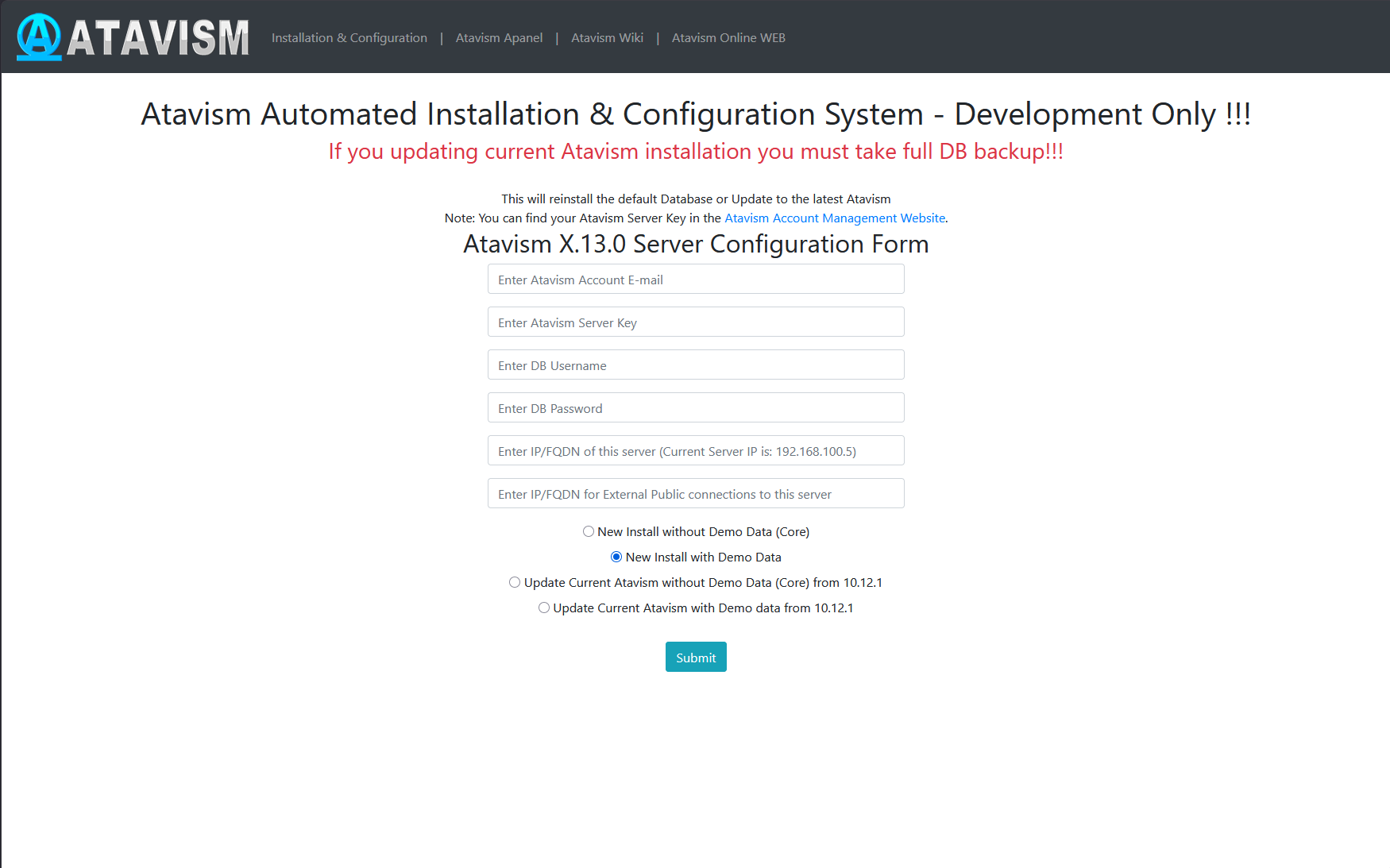
Step 2: Follow instructions like you would do the first installation, but with the option Update Current Atavism depending on your installation (Core or with Demo Data). Open the address in a web browser http://server_IP/atavism/installation/install.php
Warning: Make a Unity project backup. Importing the prefabs may break any customizations you had previously made to your ones.
Step 3: Import Atavism Unity Package, Replace Files
Import the AtavismUnity_10.13.0_Patch_10.12.1_for_{Core|Demo}.unitypackage depending on which installation you did before.
Update using Custom Linux Installation
Step 1: Replace Server Files
Copy over all server files and adjust them as you did before with the previous Atavism version. Because server-side scripts and configuration files were changed, we recommend you put a fresh copy of the Atavism 10.13.0 server files.
Step 2: Update the Databases
Important note: Each time you update your database or files, make a backup to have a copy of your work
Scripts to update your Atavism X (10.12.0) databases to Atavism X (10.12.1) are in your Atavism Server package. There are two types of scripts, structure, and data for both types of installations (Core and with Demo Data). You should use the proper ones depending on your previous installation method. In order to update the database, first, you have to update the structure, and then the data. The script file for data update :
- sql/updates/From_Atavism10.12.1/{Core|Demo}/Data/admin.sql
If you have renamed any of your databases from the default names (admin, atavism, master, world_content), make sure you have proper names in the “use” clause at the beginning of each script.
Step 3: Import Atavism Unity Package, Replace Files
Import the AtavismUnity_10.13.0_Patch_10.12.1_for_{Core|Demo}.unitypackage depending on which installation you did before.
Update using Atavism Windows Manager Installation
Step 1: Open the directory where you installed Atavism Manager (by default in c:Atavism Manager)
Step 2: Rename the atavism_server directory to atavism_server_old or any other name
Step 3: Download the Atavism server zip file from apanel
Step 4: Unpack the atavism_server*.zip file into your Atavism Manager installation directory
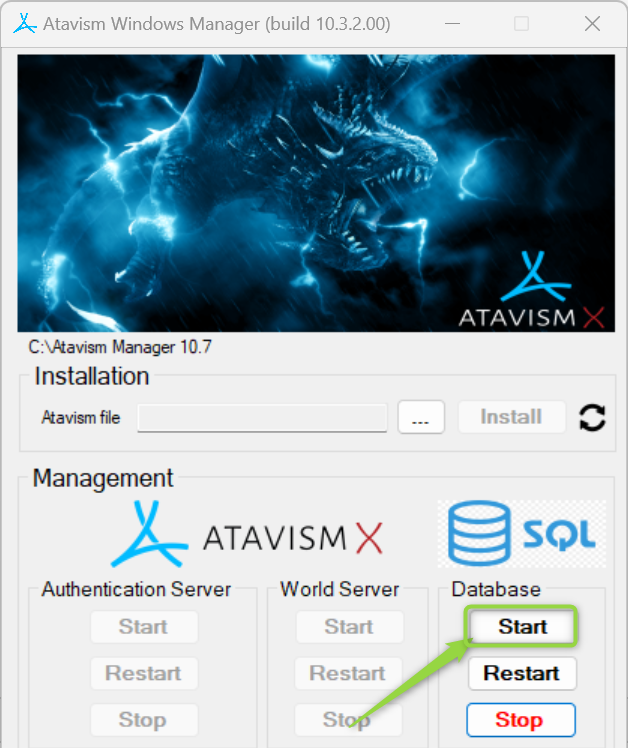
Step 5: In the Atavism Windows Manager panel start the database
Step 6: Open the command line console Windows + r shortcut and type cmd
Step 7: Change the directory to your Atavism Manager installation directory by typing the command
cd “c:\Atavism Manager\mariadb-5.5.61-win32\bin” or cd “c:\Atavism Manager\mariadb-10.6.11-winx64\bin” depending on which version of the database you are using
Step 8: Invoke database update commands where the root is the database user, the test is the password for the database user, followed by the path to the Atavism Manager installation directory. If you are not using our default databases, please adjust these commands.
If you have renamed any of your databases from the default names (admin, atavism, master, world_content) make sure you have proper names in the “use” clause at the beginning of each script.
Important note: Each time you update your database or files, make a backup to have a copy of your work
mysql -u root -ptest atavism < "c:\Atavism Manager\atavism_server\sql\updates\From_Atavism10.12.1\Demo\Structure\atavism.sql"
mysql -u root -ptest world_content < "c:\Atavism Manager\atavism_server\sql\updates\From_Atavism10.12.1\Demo\Structure\world_content.sql"
mysql -u root -ptest admin< "c:\Atavism Manager\atavism_server\sql\updates\From_Atavism10.12.1\Demo\Data\admin.sql"
mysql -u root -ptest world_content< "c:\Atavism Manager\atavism_server\sql\updates\From_Atavism10.12.1\Demo\Data\world_content.sql"
You can use any third-party tool to handle this process, for example, MySQL Workbench or any other database management tool
Step 9: Start the Atavism.exe application
Step 10: Fill data according to your previous configuration, including database credentials (if you changed them)
Step 11: Import Atavism Unity Package, Replace Files
Import the AtavismUnity_10.13.0_Patch_10.12.1_for_{Core|Demo}.unitypackage depending on which installation you did before.
List of changed files:
New Files (72)
Atavism demo\DragonsanStudios\Audio\Sounds\ResourceNodes\DebriesFalling_02.wav
Atavism demo\DragonsanStudios\Audio\Sounds\ResourceNodes\RockMining_01_01.wav
Atavism demo\DragonsanStudios\Audio\Sounds\ResourceNodes\RockMining_01_02.wav
Atavism demo\DragonsanStudios\Audio\Sounds\ResourceNodes\RockMining_01_04.wav
Atavism demo\DragonsanStudios\Audio\Sounds\ResourceNodes\TreeChopping_01.wav
Atavism demo\DragonsanStudios\Audio\Sounds\ResourceNodes\TreeChopping_01_01.wav
Atavism demo\DragonsanStudios\Audio\Sounds\ResourceNodes\TreeChopping_01_02.wav
Atavism demo\DragonsanStudios\Audio\Sounds\ResourceNodes\TreeChopping_01_03.wav
Atavism demo\DragonsanStudios\Audio\Sounds\ResourceNodes\TreeChopping_01_04.wav
Atavism demo\DragonsanStudios\Audio\Sounds\ResourceNodes\TreeChopping_01_06.wav
Atavism demo\DragonsanStudios\Audio\Sounds\ResourceNodes\TreeChopping_02.wav
Atavism demo\DragonsanStudios\Audio\Sounds\ResourceNodes\TreeChopping_02_01.wav
Atavism demo\DragonsanStudios\Audio\Sounds\ResourceNodes\TreeChopping_02_02.wav
Atavism demo\DragonsanStudios\Audio\Sounds\ResourceNodes\TreeChopping_02_03.wav
Atavism demo\DragonsanStudios\Audio\Sounds\ResourceNodes\TreeChopping_02_05.wav
Atavism demo\DragonsanStudios\Audio\Sounds\ResourceNodes\TreeChopping_03_01.wav
Atavism demo\DragonsanStudios\Audio\Sounds\ResourceNodes\TreeChopping_03_02.wav
Atavism demo\DragonsanStudios\Audio\Sounds\ResourceNodes\TreeChopping_03_03.wav
Atavism demo\DragonsanStudios\Audio\Sounds\ResourceNodes\TreeChopping_03_05.wav
Atavism demo\DragonsanStudios\Audio\Sounds\ResourceNodes\TreeChopping_03_06.wav
Atavism demo\DragonsanStudios\Audio\Sounds\ResourceNodes\TreeChopping_03_08.wav
Atavism demo\DragonsanStudios\Audio\Sounds\ResourceNodes\TreeChopping_04.wav
Atavism demo\DragonsanStudios\Audio\Sounds\ResourceNodes\TreeChopping_04_03.wav
Atavism demo\DragonsanStudios\Audio\Sounds\ResourceNodes\TreeChopping_04_06.wav
Atavism demo\DragonsanStudios\Audio\Sounds\ResourceNodes\TreeChopping_04_08.wav
Atavism demo\DragonsanStudios\Audio\Sounds\ResourceNodes\TreeChopping_04_11.wav
Atavism demo\DragonsanStudios\Audio\Sounds\ResourceNodes\TreeChopping_04_14.wav
Atavism demo\DragonsanStudios\Audio\Sounds\ResourceNodes\TreeFalling_01.wav
Atavism demo\DragonsanStudios\Audio\Sounds\ResourceNodes\TreeFalling_03.wav
Atavism demo\DragonsanStudios\Audio\Sounds\ResourceNodes\TreeFalling_04.wav
Atavism demo\DragonsanStudios\Effects\ResourceNodeMining\Debris.mat
Atavism demo\DragonsanStudios\Effects\ResourceNodeMining\Flare.png
Atavism demo\DragonsanStudios\Effects\ResourceNodeMining\Mining.prefab
Atavism demo\DragonsanStudios\Effects\ResourceNodeMining\Smoke.mat
Atavism demo\DragonsanStudios\Effects\ResourceNodeMining\Smoke.png
Atavism demo\DragonsanStudios\Effects\ResourceNodeMining\Spark.mat
Atavism demo\DragonsanStudios\Effects\ResourceNodeMining\Stone_Albedo.png
Atavism demo\DragonsanStudios\Effects\ResourceNodeMining\Stone_Height.png
Atavism demo\DragonsanStudios\Effects\ResourceNodeMining\Stone_Normal.png
Atavism demo\DragonsanStudios\Effects\ResourceNodeWoodcutting\ApplyGravity.cs
Atavism demo\DragonsanStudios\Effects\ResourceNodeWoodcutting\prefab_Fir_04_Standalone_cheap.prefab
Atavism demo\DragonsanStudios\Effects\ResourceNodeWoodcutting\ResetRigidbody.cs
Atavism demo\DragonsanStudios\Effects\ResourceNodeWoodcutting\Tree.physicMaterial
Atavism demo\DragonsanStudios\Effects\ResourceNodeWoodcutting\TreeFallReplaceModelPhysics.anim
Atavism demo\DragonsanStudios\Effects\ResourceNodeWoodcutting\TreeFallReplaceModelPhysicsDefault.anim
Atavism demo\DragonsanStudios\Effects\ResourceNodeWoodcutting\TreeFallReplaceModelPhysicsRestore.anim
Atavism demo\DragonsanStudios\Effects\ResourceNodeWoodcutting\Woodcutting.prefab
Atavism demo\DragonsanStudios\Effects\ResourceNodeWoodcutting\WoodDebris.mat
Atavism demo\DragonsanStudios\Effects\ResourceNodeWoodcutting\WoodDebris.png
Atavism demo\OtherPackages\NatureManufacture Assets\Mountain Tree Pack Trial\Foliage Trial\Materials\M_Fir_05_Cross.mat
Atavism demo\OtherPackages\NatureManufacture Assets\Mountain Tree Pack Trial\Foliage Trial\Models\Split\Materials\M_Fir_Bark_02_Trunk.mat
Atavism demo\OtherPackages\NatureManufacture Assets\Mountain Tree Pack Trial\Foliage Trial\Models\Split\Textures\Fir_05_Standalone_cheap_Split_08_M_Bark_Fir_02_Trunk_BaseColor.png
Atavism demo\OtherPackages\NatureManufacture Assets\Mountain Tree Pack Trial\Foliage Trial\Models\Split\Textures\Fir_05_Standalone_cheap_Split_08_M_Bark_Fir_02_Trunk_Height.png
Atavism demo\OtherPackages\NatureManufacture Assets\Mountain Tree Pack Trial\Foliage Trial\Models\Split\Textures\Fir_05_Standalone_cheap_Split_08_M_Bark_Fir_02_Trunk_Normal.png
Atavism demo\OtherPackages\NatureManufacture Assets\Mountain Tree Pack Trial\Foliage Trial\Models\Split\Fir_05_Standalone_cheap_Split.fbx
Atavism demo\OtherPackages\NatureManufacture Assets\NatureManufacture Wind\3DNoise.psd
Atavism demo\OtherPackages\NatureManufacture Assets\NatureManufacture Wind\GustNoise.psd
Atavism demo\OtherPackages\NatureManufacture Assets\NatureManufacture Wind\NM_Wind.cs
Atavism demo\OtherPackages\NatureManufacture Assets\NatureManufacture Wind\Prefab_Wind.prefab
Atavism demo\OtherPackages\NatureManufacture Assets\NatureManufacture Wind\Prefab_Wind_Spherical.prefab
Dragonsan\AtavismManager\Scripts\Attribute\Editor\AtavismItemQualityAttributeDrawer.cs
Dragonsan\AtavismManager\Scripts\Attribute\AtavismItemQualityAttribute.cs
Dragonsan\AtavismObjects\Scripts\GameObject Components\ShaderDissolveController.cs
Dragonsan\AtavismObjects\Scripts\UGUI\UGUIPvpButton.cs
Dragonsan\AtavismObjects\Scripts\UGUI\UGUIPvpMessage.cs
Dragonsan\AtavismObjects\Scripts\UGUI\UIAtavismPvpButton.cs
Dragonsan\Scenes\MainWorldPvP.unity
Resources\Content\CoordinatedEffects\ChopTreeFall.prefab
StreamingAssets\infinitypbr
StreamingAssets\infinitypbr.manifest
StreamingAssets\StreamingAssets
StreamingAssets\StreamingAssets.manifest
Modified Files (209)
Atavism demo\DragonsanStudios\Effects\Particles\Rocks.prefab
Atavism demo\DragonsanStudios\Effects\Prefabs\2.Warrior\Prefabs\15Warrior15_Target_Hit1.prefab
Atavism demo\OtherPackages\Enviro 3 – Limited for Atavism\Profiles\Configurations\Enviro Limited Configuration for Atavism.asset
Atavism demo\OtherPackages\Enviro 3 – Limited for Atavism\Profiles\Weather Types\Cloudy 1.asset
Atavism demo\OtherPackages\Enviro 3 – Limited for Atavism\Profiles\Weather Types\Cloudy 2.asset
Atavism demo\OtherPackages\Enviro 3 – Limited for Atavism\Profiles\Weather Types\Foggy.asset
Atavism demo\OtherPackages\Enviro 3 – Limited for Atavism\Scripts\Editor\Base\EnviroBaseInspector.cs
Atavism demo\OtherPackages\Enviro 3 – Limited for Atavism\Scripts\Editor\Base\EnviroDefineSymbol.cs
Atavism demo\OtherPackages\Enviro 3 – Limited for Atavism\Scripts\Runtime\Base\Renderer\EnviroURPRenderFeature.cs
Atavism demo\OtherPackages\Enviro 3 – Limited for Atavism\Scripts\Runtime\Base\Renderer\EnviroURPRenderPass.cs
Atavism demo\OtherPackages\Enviro 3 – Limited for Atavism\Scripts\Runtime\Base\EnviroHelper.cs
Atavism demo\OtherPackages\Enviro 3 – Limited for Atavism\Scripts\Runtime\Base\EnviroManager.cs
Atavism demo\OtherPackages\Enviro 3 – Limited for Atavism\Scripts\Runtime\Modules\Fog\EnviroFogModule.cs
Atavism demo\OtherPackages\Explosive\Warrior Pack Bundle 2 FREE\2Handed Warrior Mecanim Animation\Materials\2Handed.mat
Atavism demo\OtherPackages\KriptoFX\Realistic Effects Pack v4\Effects\Materials\Effect3\DecalCollision 1.mat
Atavism demo\OtherPackages\NatureManufacture Assets\Foliage Shaders\Tree_Bark_Metalic.shader
Atavism demo\OtherPackages\NatureManufacture Assets\Foliage Shaders\Tree_Leaves_Specular.shader
Atavism demo\OtherPackages\NatureManufacture Assets\Mountain Tree Pack Trial\Foliage Trial\Materials\M_Fir_Bark_02.mat
Atavism demo\OtherPackages\NatureManufacture Assets\Mountain Tree Pack Trial\Foliage Trial\Materials\M_Fir_Leaves.mat
Atavism demo\OtherPackages\NatureManufacture Assets\Mountain Tree Pack Trial\Foliage Trial\TreeAnimator.controller
Atavism demo\OtherPackages\NatureManufacture Assets\River Auto Material Trial\Materials\R.A.M 2019 Trial River_U 1.mat
Atavism demo\OtherPackages\Procedural Worlds\CTS\Terrains\Terrain_0_0-20180122-123716_2104044.mat
Atavism demo\OtherPackages\Unity\Blacksmith\Models\Textures\Props\prop_barrel_01_a.tif
Atavism demo\OtherPackages\Unity\Blacksmith\Models\Textures\Props\prop_barrel_01_m.tif
Atavism demo\URP and HDRP support\Editor\Atavism_HDRP_Support.unitypackage
Atavism demo\URP and HDRP support\Editor\Atavism_URP_Support.unitypackage
Atavism demo\Terrain_0_0-20180122-123716 1 1.asset
Dragonsan\Atavism (UI Toolkit)\Scripts\Data\ATAVISM_EVENT_DATA.cs
Dragonsan\Atavism (UI Toolkit)\Scripts\Data\ATAVISM_PROPERTIES.cs
Dragonsan\Atavism (UI Toolkit)\UI\Scripts\Base\UIAtavismWindowBase.cs
Dragonsan\Atavism (UI Toolkit)\UI\Scripts\Custom UI\UIButtonToggle.cs
Dragonsan\Atavism (UI Toolkit)\UI\Scripts\Custom UI\UIButtonToggleGroup.cs
Dragonsan\Atavism (UI Toolkit)\UI\Scripts\Custom UI\UIButtonToggleGroupPanel.cs
Dragonsan\Atavism (UI Toolkit)\UI\Scripts\Custom UI\UIDropdown.cs
Dragonsan\Atavism (UI Toolkit)\UI\Scripts\Custom UI\UIDropdownPopup.cs
Dragonsan\Atavism (UI Toolkit)\UI\Scripts\Custom UI\UIFillerElement.cs
Dragonsan\Atavism (UI Toolkit)\UI\Scripts\Custom UI\UIProgressBar.cs
Dragonsan\Atavism (UI Toolkit)\UI\Scripts\Custom UI\UITextField.cs
Dragonsan\Atavism (UI Toolkit)\UI\Scripts\Game\HUD\Controllers\UIAtavismEffectSlot.cs
Dragonsan\Atavism (UI Toolkit)\UI\Scripts\Game\HUD\Controllers\UIAtavismGroupDice.cs
Dragonsan\Atavism (UI Toolkit)\UI\Scripts\Game\HUD\Controllers\UIAtavismGroupLootSettings.cs
Dragonsan\Atavism (UI Toolkit)\UI\Scripts\Game\HUD\Controllers\UIAtavismItemDisplay.cs
Dragonsan\Atavism (UI Toolkit)\UI\Scripts\Game\HUD\Controllers\UIAtavismVitalityStatProgressBar.cs
Dragonsan\Atavism (UI Toolkit)\UI\Scripts\Game\HUD\UIAtaviemContextManager.cs
Dragonsan\Atavism (UI Toolkit)\UI\Scripts\Game\HUD\UIAtavismAnnouncementsManager.cs
Dragonsan\Atavism (UI Toolkit)\UI\Scripts\Game\HUD\UIAtavismPortraitsManager.cs
Dragonsan\Atavism (UI Toolkit)\UI\Scripts\Game\Windows\SupportFiles\LootListEntryUXML.cs
Dragonsan\Atavism (UI Toolkit)\UI\Scripts\Game\Windows\SupportFiles\UIAtavismGraphicSettings.cs
Dragonsan\Atavism (UI Toolkit)\UI\Scripts\Game\Windows\UIAtavismAdminPanel.cs
Dragonsan\Atavism (UI Toolkit)\UI\Scripts\Game\Windows\UIAtavismCharacterProfileManager.cs
Dragonsan\Atavism (UI Toolkit)\UI\Scripts\Game\Windows\UIAtavismConfirmationPanel.cs
Dragonsan\Atavism (UI Toolkit)\UI\Scripts\Game\Windows\UIAtavismCurrencyDisplay.cs
Dragonsan\Atavism (UI Toolkit)\UI\Scripts\Game\Windows\UIAtavismGeneralSettings.cs
Dragonsan\Atavism (UI Toolkit)\UI\Scripts\Game\Windows\UIAtavismMailRead.cs
Dragonsan\Atavism (UI Toolkit)\UI\Scripts\Game\Windows\UIAtavismMenuBar.cs
Dragonsan\Atavism (UI Toolkit)\UI\Scripts\Game\Windows\UIAtavismMerchantPanel.cs
Dragonsan\Atavism (UI Toolkit)\UI\Scripts\Game\Windows\UIAtavismOtherCharacterPanel.cs
Dragonsan\Atavism (UI Toolkit)\UI\Scripts\Game\Windows\UIAtavismPetInventoryPanel.cs
Dragonsan\Atavism (UI Toolkit)\UI\Scripts\Game\Windows\UIAtavismRanking.cs
Dragonsan\Atavism (UI Toolkit)\UI\Scripts\Game\Windows\UIAtavismRankingListEntry.cs
Dragonsan\Atavism (UI Toolkit)\UI\Scripts\Lobby\Controllers\UICharacterSelectionSlot.cs
Dragonsan\Atavism (UI Toolkit)\UI\Scripts\Lobby\Controllers\UICreateCharacterSlot.cs
Dragonsan\Atavism (UI Toolkit)\UI\Scripts\Lobby\Controllers\UICustomizerColorPropertyController.cs
Dragonsan\Atavism (UI Toolkit)\UI\Scripts\Lobby\Controllers\UICustomizerSliderPropertyController.cs
Dragonsan\Atavism (UI Toolkit)\UI\Settings\UIAudioTemplate.asset
Dragonsan\Atavism (UI Toolkit)\UI\Settings\UIToolkit_Def.asset
Dragonsan\Atavism (UI Toolkit)\UI\Settings\UIToolkit_DefaultPanelSettings.asset
Dragonsan\Atavism (UI Toolkit)\UI\Settings\UIToolkit_Popup.asset
Dragonsan\Atavism (UI Toolkit)\UI\Settings\UIToolkit_Windows.asset
Dragonsan\Atavism (UI Toolkit)\UI\Style Sheets\AtavismDefaultStyleSheet.uss
Dragonsan\Atavism (UI Toolkit)\UI\Style Sheets\AtavismPotraitStyleSheet.uss
Dragonsan\Atavism (UI Toolkit)\UI\Uxml\Game\Dependencies\UIAtavismAchievementListEntry.uxml
Dragonsan\Atavism (UI Toolkit)\UI\Uxml\Game\Dependencies\UIAtavismCurrencyInputsPanel.uxml
Dragonsan\Atavism (UI Toolkit)\UI\Uxml\Game\Dependencies\UIAtavismFactionListEntry.uxml
Dragonsan\Atavism (UI Toolkit)\UI\Uxml\Game\Dependencies\UIAtavismGuildRankElement.uxml
Dragonsan\Atavism (UI Toolkit)\UI\Uxml\Game\Dependencies\UIAtavismSkillCraftEntry.uxml
Dragonsan\Atavism (UI Toolkit)\UI\Uxml\Game\Dependencies\UIAtavismTradePartnerItem.uxml
Dragonsan\Atavism (UI Toolkit)\UI\Uxml\Game\PortraitsScreen\UIPortraitEffectTemplateDefault.uxml
Dragonsan\Atavism (UI Toolkit)\UI\Uxml\Game\PortraitsScreen\UIPortraitGroupMemberTemplate.uxml
Dragonsan\Atavism (UI Toolkit)\UI\Uxml\Game\Windows\UIAtavismAuctionPanel.uxml
Dragonsan\Atavism (UI Toolkit)\UI\Uxml\Game\Windows\UIAtavismCraftingBookPanel.uxml
Dragonsan\Atavism (UI Toolkit)\UI\Uxml\Game\UIAnnouncementsScreen.uxml
Dragonsan\Atavism (UI Toolkit)\UI\Uxml\Game\UIAtaviamChatScreen.uxml
Dragonsan\Atavism (UI Toolkit)\UI\Uxml\Game\UIAtavismAdminPanel.uxml
Dragonsan\Atavism (UI Toolkit)\UI\Uxml\Game\UIAtavismCastingBar.uxml
Dragonsan\Atavism (UI Toolkit)\UI\Uxml\Game\UIAtavismControllSettings.uxml
Dragonsan\Atavism (UI Toolkit)\UI\Uxml\Game\UIAtavismGearModWindow.uxml
Dragonsan\Atavism (UI Toolkit)\UI\Uxml\Game\UIAtavismGeneralSettings.uxml
Dragonsan\Atavism (UI Toolkit)\UI\Uxml\Game\UIAtavismGraphicSettings.uxml
Dragonsan\Atavism (UI Toolkit)\UI\Uxml\Game\UIAtavismGuildAddMemberPanel.uxml
Dragonsan\Atavism (UI Toolkit)\UI\Uxml\Game\UIAtavismGuildCreatePanel.uxml
Dragonsan\Atavism (UI Toolkit)\UI\Uxml\Game\UIAtavismGuildEditMotdPanel.uxml
Dragonsan\Atavism (UI Toolkit)\UI\Uxml\Game\UIAtavismGuildPanel.uxml
Dragonsan\Atavism (UI Toolkit)\UI\Uxml\Game\UIAtavismGuildSettings.uxml
Dragonsan\Atavism (UI Toolkit)\UI\Uxml\Game\UIAtavismMailPanel.uxml
Dragonsan\Atavism (UI Toolkit)\UI\Uxml\Game\UIAtavismMerchantPanel.uxml
Dragonsan\Atavism (UI Toolkit)\UI\Uxml\Game\UIAtavismPetCommands.uxml
Dragonsan\Atavism (UI Toolkit)\UI\Uxml\Game\UIAtavismPowerUp.uxml
Dragonsan\Atavism (UI Toolkit)\UI\Uxml\Game\UIAtavismQuestPanel.uxml
Dragonsan\Atavism (UI Toolkit)\UI\Uxml\Game\UIAtavismSceneLoader.uxml
Dragonsan\Atavism (UI Toolkit)\UI\Uxml\Game\UIAtavismSettings.uxml
Dragonsan\Atavism (UI Toolkit)\UI\Uxml\Game\UIAtavismShopCreatePanel.uxml
Dragonsan\Atavism (UI Toolkit)\UI\Uxml\Game\UIAtavismShopPanel.uxml
Dragonsan\Atavism (UI Toolkit)\UI\Uxml\Game\UIAtavismSkillWindow.uxml
Dragonsan\Atavism (UI Toolkit)\UI\Uxml\Game\UIAtavismSocialPanel.uxml
Dragonsan\Atavism (UI Toolkit)\UI\Uxml\Game\UIAtavismSpawner.uxml
Dragonsan\Atavism (UI Toolkit)\UI\Uxml\Game\UIAtavismTimer.uxml
Dragonsan\Atavism (UI Toolkit)\UI\Uxml\Game\UIAtavismVIPWindow.uxml
Dragonsan\Atavism (UI Toolkit)\UI\Uxml\Game\UIAtavismWorldBuilderWindow.uxml
Dragonsan\Atavism (UI Toolkit)\UI\Uxml\Game\UIAtavismXPBar.uxml
Dragonsan\Atavism (UI Toolkit)\UI\Uxml\Game\UIPortraitsScreen.uxml
Dragonsan\Atavism (UI Toolkit)\UI\Uxml\Lobby\Dependencies\UICustomizerItemSliderController.uxml
Dragonsan\Atavism (UI Toolkit)\UI\Uxml\Lobby\UICharacterCreationScreen.uxml
Dragonsan\Atavism (UI Toolkit)\UI\Uxml\Lobby\UICharacterServerSelectionScreen.uxml
Dragonsan\Atavism (UI Toolkit)\UI\Uxml\Lobby\UILoadingPrefabData.uxml
Dragonsan\Atavism (UI Toolkit)\UI\Uxml\Lobby\UILoginSceneScreen.uxml
Dragonsan\Atavism (UI Toolkit)\UI\Uxml\Lobby\UIServerSelectionList.uxml
Dragonsan\Atavism Core\Base\AtavismClient.cs
Dragonsan\Atavism Core\Base\AtavismWorldManager.cs
Dragonsan\Atavism Core\Editor\InitialSetup.cs
Dragonsan\AtavismEditor\Editor\EditorCore\AtavismEditorFunctions.cs
Dragonsan\AtavismManager\Editor\Scripts\AtavismManagerEditor.cs
Dragonsan\AtavismManager\Editor\Scripts\UIAtavismRegions.cs
Dragonsan\AtavismManager\Resources\Settings\Camera\CameraDefaultSettings.asset
Dragonsan\AtavismManager\Resources\Settings\CameraPresets\3DLinearZoomPreset.asset
Dragonsan\AtavismManager\Resources\Settings\CameraPresets\3DNoZoomPreset.asset
Dragonsan\AtavismManager\Resources\Settings\CameraPresets\3DPreset.asset
Dragonsan\AtavismManager\Resources\Settings\CameraPresets\TopDownNoRotationNoZoomPreset.asset
Dragonsan\AtavismManager\Resources\Settings\CameraPresets\TopDownNoRotationZoomPreset.asset
Dragonsan\AtavismManager\Resources\Settings\CameraPresets\TopDownRotationNoZoomPreset.asset
Dragonsan\AtavismManager\Resources\Settings\CameraPresets\TopDownRotationZoomPreset.asset
Dragonsan\AtavismManager\Resources\Settings\Controller\ControllerDefaultSettings.asset
Dragonsan\AtavismManager\Resources\Settings\GeneralSettings.asset
Dragonsan\AtavismManager\Resources\Settings\NpcAudioSettings.asset
Dragonsan\AtavismManager\Scripts\Editor\CameraPresetSettingsEditor.cs
Dragonsan\AtavismManager\Scripts\Editor\CameraSettingsEditor.cs
Dragonsan\AtavismManager\Scripts\CameraPresetSettings.cs
Dragonsan\AtavismManager\Scripts\CameraSettings.cs
Dragonsan\AtavismManager\Scripts\GeneralSettings.cs
Dragonsan\AtavismObjects\Prefabs\UI\CanvasSettings.prefab
Dragonsan\AtavismObjects\Prefabs\UI-UGUI.prefab
Dragonsan\AtavismObjects\Prefabs\UI-UIToolkit.prefab
Dragonsan\AtavismObjects\Prefabs\WorldBoundary.prefab
Dragonsan\AtavismObjects\Scripts\CoordinatedEffects\CoordAnimation.cs
Dragonsan\AtavismObjects\Scripts\GameObject Components\Editor\AtavismRegionEditor.cs
Dragonsan\AtavismObjects\Scripts\GameObject Components\AtavismMobSpawnMarkerGenerator.cs
Dragonsan\AtavismObjects\Scripts\GameObject Components\AtavismRegion.cs
Dragonsan\AtavismObjects\Scripts\GameObject Components\InteractiveObject.cs
Dragonsan\AtavismObjects\Scripts\GameObject Components\ResourceNode.cs
Dragonsan\AtavismObjects\Scripts\UGUI\UGUIAdminPanel.cs
Dragonsan\AtavismObjects\Scripts\UGUI\UGUICharacterPanel.cs
Dragonsan\AtavismObjects\Scripts\UGUI\UGUIErrorText.cs
Dragonsan\AtavismObjects\Scripts\UGUI\UGUIGameMenu.cs
Dragonsan\AtavismObjects\Scripts\UGUI\UGUIOtherCharacterPanel.cs
Dragonsan\AtavismObjects\Scripts\UGUI\UGUIPetCharacterPanel.cs
Dragonsan\AtavismObjects\Scripts\UGUI\UGUIRanking.cs
Dragonsan\AtavismObjects\Scripts\UGUI\UGUIRankingSlot.cs
Dragonsan\AtavismObjects\Scripts\UGUI\UGUITargetPortrait.cs
Dragonsan\AtavismObjects\Scripts\UGUI\UGUIUrl.cs
Dragonsan\AtavismObjects\Scripts\UGUI\UIGeneralSettings.cs
Dragonsan\AtavismObjects\Scripts\UGUI\UIGraphicSettings.cs
Dragonsan\AtavismObjects\Scripts\Abilities.cs
Dragonsan\AtavismObjects\Scripts\AtavismCombat.cs
Dragonsan\AtavismObjects\Scripts\AtavismCursor.cs
Dragonsan\AtavismObjects\Scripts\AtavismEventMessageHandler.cs
Dragonsan\AtavismObjects\Scripts\AtavismInputSystemManager.cs
Dragonsan\AtavismObjects\Scripts\AtavismMecanimMobController3D.cs
Dragonsan\AtavismObjects\Scripts\AtavismMobAppearance.cs
Dragonsan\AtavismObjects\Scripts\AtavismMobName.cs
Dragonsan\AtavismObjects\Scripts\AtavismPostProcessing.cs
Dragonsan\AtavismObjects\Scripts\AtavismPrefabManager.cs
Dragonsan\AtavismObjects\Scripts\AtavismScriptEvent.cs
Dragonsan\AtavismObjects\Scripts\AtavismSettings.cs
Dragonsan\AtavismObjects\Scripts\AtavismUniversalInput.cs
Dragonsan\AtavismObjects\Scripts\CharacterSelectionCreationManager.cs
Dragonsan\AtavismObjects\Scripts\GroundItemDisplay.cs
Dragonsan\AtavismObjects\Scripts\GroundLootManager.cs
Dragonsan\AtavismObjects\Scripts\InteractiveObjectsManager.cs
Dragonsan\AtavismObjects\Scripts\Inventory.cs
Dragonsan\AtavismObjects\Scripts\Quests.cs
Dragonsan\AtavismObjects\Scripts\StandardCommands.cs
Dragonsan\AtavismObjects\Scripts\WorldBuilder.cs
Dragonsan\AtavismObjects\Scripts\WorldBuilderInterface.cs
Dragonsan\AtavismObjects\AnimatorController.controller
Dragonsan\ContextSystem\Scripts\ContextInfo.cs
Dragonsan\ContextSystem\Scripts\ContextManager.cs
Dragonsan\Easy Build System for Atavism\Example Scenes\Shared Contents\Scripts\CrossPlatformInput\Scripts\Joystick.cs
Dragonsan\Loading Screen for Atavism\Content\Resources\SceneLoaderManager.asset
Dragonsan\Scenes\UI Toolkit\CharacterSelection.unity
Dragonsan\Scenes\UI Toolkit\Login.unity
Dragonsan\Scenes\Arena1v1.unity
Dragonsan\Scenes\Arena2v2.unity
Dragonsan\Scenes\CharacterSelection.unity
Dragonsan\Scenes\Deathmatch 1v1.unity
Dragonsan\Scenes\Deathmatch 2v2.unity
Dragonsan\Scenes\GuildPrivate.unity
Dragonsan\Scenes\Login.unity
Dragonsan\Scenes\MainWorld.unity
Dragonsan\Scenes\SinglePlayerPrivate.unity
Dragonsan\UGUIMiniMap for Atavism\Content\Prefabs\Instances\MiniMapPlane.prefab
Dragonsan\AtavismInputSystem_Actions.inputactions
Resources\Content\CoordinatedEffects\Warrior\UnsheathSwordBack.prefab
Resources\Content\CoordinatedEffects\ChopTree.prefab
Resources\Content\CoordinatedEffects\ChopTreeRestorePosition.prefab
Resources\Content\CoordinatedEffects\HarvestRock Activate.prefab
Resources\Content\CoordinatedEffects\HarvestRock Deactivate.prefab
Resources\Content\CoordinatedEffects\HarvestRock.prefab
Resources\Content\EquipmentDisplay\Tools\Axe01.prefab
Resources\Content\EquipmentDisplay\Tools\Pickaxe01.prefab